

CybaVerse were recently engaged for incident response where a threat actor had gained initial access via a password guessing attack on the FortiGate SSL VPN and over a week of not being detected had performed several actions.
- Exfiltrated data from file shares via SMB.
- Attempted lateral movement to the cloud environment.
- Used an infostealer that targeted browser autofill data and cookies.
- Dumped the SAM (Security Account Manager) database and LSA secrets on several hosts.
- Performed a DCSync attack to get all domain account password hashes.
- Made use of Evil-WinRM to try to identify backup software.
- Attempted to create Windows Defender exclusions.
In this guide we'll break down what we saw and the lessons learnt so that you can detect and prevent these techniques in your own environments.
Initial Access
The threat actor had gained initial access via a FortiGate SSL VPN. When reviewing the FortiGate SSL VPN logs we identified sign-ins from an employee that had left the company and this immediately stood out. A sample of what this event looks like in the FortiGate SSL VPN logs is shown in figure 1. However, any identifying information has been redacted.
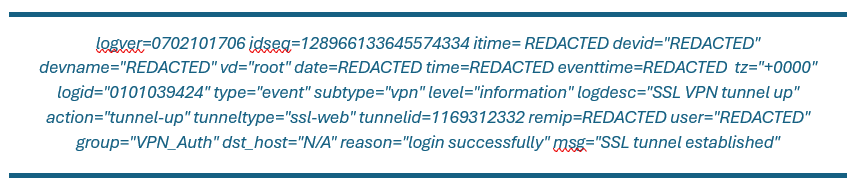
Figure 1 – Successful sign-in on FortiGate SSL VPN
In figure 2 (below), CybaVerse saw another event just after the event detailed in figure 1 and this gave us some additional information as to what IP address the SSL VPN assigned the threat actor (this has been redacted). But also, CybaVerse picked up on the fact that this was an LDAP auth profile. LDAP does not support MFA natively when compared to modern alternatives such as SAML or OIDC. Therefore, this answered the question as to how the threat actor was able to authenticate to the VPN without having to satisfy MFA.
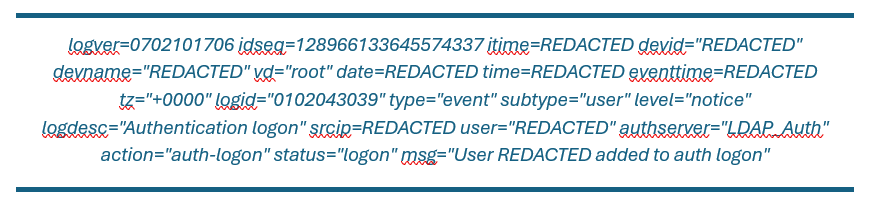 Figure 2 – Successful sign-in on FortiGate SSL VPN
Taking the user and looking at previous sign-in attempts we can see that prior to the 15th of February 2026 all sign-in attempts for the user failed as shown in figure 3. This evidence suggests a successful password guessing attack, there were also guesses against other accounts and the names of accounts would suggest a dictionary attack or password stuffing attack was used and the intervals would suggest a scripted password guessing attack.
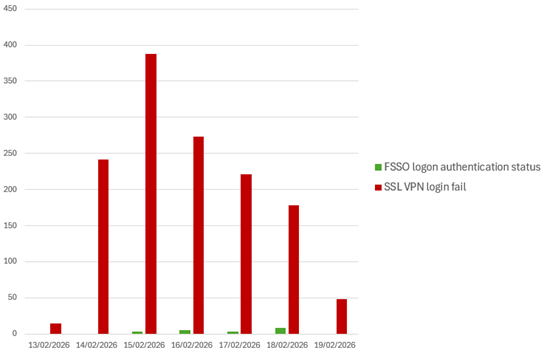
Figure 3 – Evidence of password guessing attack
Exfiltration of Data
After gaining access via the FortiGate VPN, CybaVerse used the FortiGate logs to identify evidence of data exfiltration. An example of these FortiGate firewall logs is shown in figure 4 (below). CybaVerse built a Python script to convert this into a CSV so that data could be used in a standardised format.
Key Takeaways
- Always use multi-factor authentication for any publicly exposed services such as VPNs.
- Follow the principle of least privilege with VPN roles making sure that each user has the access that they need to perform their role.
- Avoid using LDAP if you can use a modern SSO protocol such as SAML / OIDC.
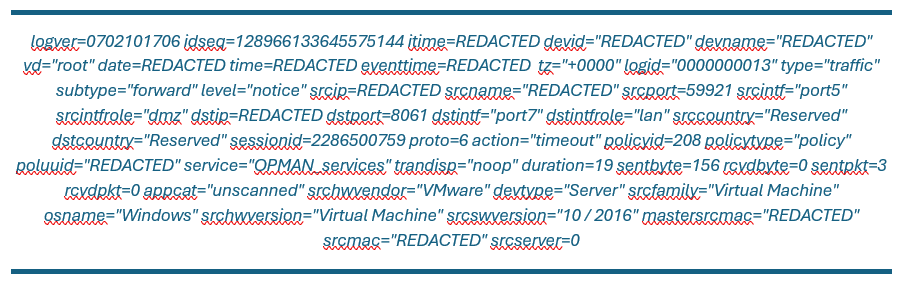 Figure 4 – FortiGate Firewall Logs
The FortiGate firewall logs contain useful information such as the destination IP, destination port and the sent and received bytes. As CybaVerse knew the IP address the threat actor was assigned by the FortiGate SSL VPN we could correlate it with the traffic.
When CybaVerse correlated all the traffic with the VPN session and calculated the sum of bytes sent and received it was evidence that data exfiltration had occurred. As you will see in figure 5 the bytes received from the two file shares was 100 GB for the first file share and 120 GB for the second file share.
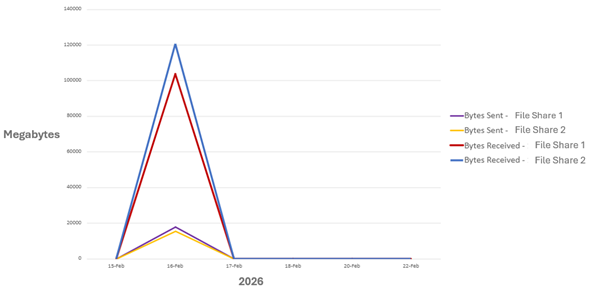
Figure 5 – FortiGate traffic logs correlated with VPN sessions
At this point in a forensic investigation, you would be looking for evidence of the files that had been accessed / downloaded or evidence of data staging / archiving. The problem here is that the threat actor had connected to the file shares via SMB over the VPN directly from their own host that CybaVerse had no visibility over. However, despite the large volume of data transferred the file share itself was used as intended.
There were no mass data staging and SMB is not an interactive protocol so there are no file-folder access artifacts such as Shellbags.
For companies operating in the United Kingdom or processing data on residents within the United Kingdom, it’s important to highlight that if there is evidence of a data breach that involves personal data you have to disclose this to the ICO (Information Commissioner’s Office) within 72 hours of identifying the personal data breach. In this case, CybaVerse had evidence to suggest data exfiltration had occurred that could have involved personal data and the client was advised to report this to the ICO.
Auditing access on file shares is possible if you enable the Audit File Share Policy on file shares. With this enabled the event ID 5140 can be used to audit network share object access that details who accessed which object and from where they accessed it. It is possible to take this one step further with the Audit Detailed File Share Policy which logs event ID 5145 which additionally logs if access to a network share object access was granted.
The audit file share policies are not enabled by default. However, CybaVerse would recommend enabling them on file shares as they would have identified exactly what the threat actor could have exfiltrated in this case.
Additionally, the audit file share policies create a lot of events on file shares due to legitimate file share access. It’s also important that you send event logs to a SIEM to make sure that these events are retained for at least 30 – 90 days in hot storage for them to be useful.
Key Takeaways
- Enable the Audit File Share Policy and optionally Audit Detailed File Share Policy on file shares. Send event logs to a SIEM where they are retained for at least 30 – 90 days in hot storage.
- Use VPN session limits to limit duration, bandwidth and close idle sessions.
- Use NIDS (Network Intrusion Detection Systems) / NIPS (Network Intrusion Prevention Systems) that have the capability to detect anomalous data transfer volumes.
Pivoting to the Cloud
After the initial compromise and exfiltration, the threat actor had attempted to pivot to the cloud environment. This is becoming more prevalent as organisations continue to move more infrastructure into the cloud.
In figure 6 (below), you will see from CrowdStrike evidence of the use of Azure CLI to get access to the cloud environment using the Azure AD Sync account that is used to sync Microsoft Entra with on-prem AD. You will also notice some Russian comments indicating that the threat actor was Russian speaking.
The threat actor attempted to use the Resource Owner Password Credentials (ROPC) authentication flow to authenticate using the Azure AD Sync account to then enumerate users using Microsoft Graph. ROPC is a legacy authentication flow and Microsoft recommends not to use it because it’s incompatible with Multi-Factor Authentication (MFA).
This would have been intentional from the threat actor as they would have been trying to find ways around using MFA.
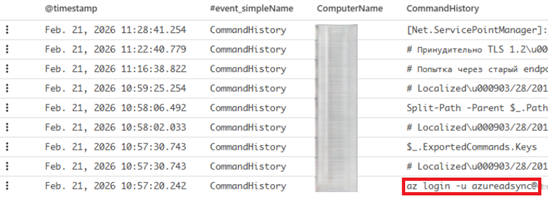 Figure 6 – Threat Actor using Azure CLI
When reviewing the sign-in logs within Microsoft Entra ID for the Azure AD Sync user CybaVerse could see that access was not successful. As shown in figure 7 authentication failed for the following reasons.
- 50072 - Due to a configuration change made by the admin such as a Conditional Access policy, per-user enforcement, or because the user moved to a new location, the user is required to use multifactor authentication.
- 50126 - Error validating credentials due to invalid username or password.
- 90072 - The external account that the user signs in with doesn't exist on the tenant that they signed into; so, the user can't satisfy the MFA requirements for the tenant
- 50079 - Due to a configuration change made by the admin such as a Conditional Access policy, per-user enforcement, or because the user moved to a new location, the user is required to use multifactor authentication.
As the threat actor was using one of the compromised servers to try to authenticate to Azure the first authentications came from a Microsoft data centre IP address as the server was hosted in Azure. This is a key example of why you can’t conclude Microsoft IP addresses as safe just based on the fact it’s a Microsoft IP as it also hosts a commercial cloud. Similar would go for AWS or Google Cloud amongst other public clouds.
The latter IP address you see is a Tor exit node. After failing directly from a compromised endpoint. The threat actor then attempted from one of their own endpoints that was using the Tor network. This attempt failed as well.
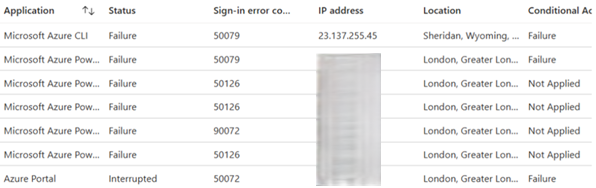 Figure 7 – Threat Actor Sign-In Logs in Microsoft Entra ID
Looking at the commands executed by the threat actor CybaVerse could see the threat actor was attempting to access the Microsoft Graph https://graph.microsoft.com/v1.0/users endpoint in order to enumerate all the Microsoft Entra ID users. It is likely that had they been successful they would have enumerated groups, roles, subscriptions, resources etc. AzureHound is a well-known script that can automate this enumeration. CybaVerse believe that the threat actors’ intention would have been to ultimately escalate to global administrator and perform further exfiltration from Azure storage accounts and then delete any cloud backups and encrypt any data or resources that they can’t delete and finally extort the victim.
Key Takeaways
- If using Microsoft Entra ID, then make use of conditional access policies to enforce Multi-Factor Authentication (MFA) and restrict access only from trusted locations for both standard users and administrators.
- Block legacy authentication flows such as Resource Owner Password Credentials (ROPC) by using conditional access policies.
- Use application control to provide fine control over the downloading of command line tools such as Azure CLI to prevent both intended and unintended misuse.
Credential Gathering
Dumping the SAM (Security Account Manager) Database
In CrowdStrike there were a few registry queries which got flagged up under the credential dumping technique. The process that CrowdStrike flagged on was below.
C:\Windows\system32\svchost.exe -k localService -p -s RemoteRegistry
A common failure CybaVerse see amongst SOC analysts is that they conclude this must be legitimate because svchost.exe is in the expected path and the hash shows that it is a legitimate Microsoft signed binary.
However, this is a remote registry query and when CybaVerse looked further into it we can see the registry query was for the registry key below.
\REGISTRY\MACHINE\SAM\SAM\Domains\Account
This registry key is particularly sensitive because the SAM database stores the password of local users in a hashed format (LM or NTLM). If a threat actor can dump the SAM database, they can take those hashes offline and crack them using a password cracker. This is a privilege escalation technique as a threat actor may find an account with higher privileges that gets them closer to their objectives.
DCSync Attack
CybaVerse also identified a DCSync attack. Domain controllers authenticate users in a domain environment using the Kerberos protocols. To do this domain controllers need to store password hashes inside of a database called the ntds.dit database. Domain controllers that are part of the same Active Directory forest will replicate the Active Directory objects stored inside of the ntds.dit database to provide high availability and consistency across the domain. A threat actor with domain administrator privileges can force a domain controller to replicate to the threat actors host and in doing so can get the password hashes for all domain users, administrators, service accounts and even the KRBTGT account that is used for creating Kerberos tickets.
The threat actor can then take these hashes offline and crack them using a password cracker.
CybaVerse identified a DCSync attack by looking at the event ID 4662 in the security event logs on one of the domain controllers. The event ID 4662 is logged when an operation was performed on an Active Directory object.
The 4662 event identifies the user that performed the operation. Legitimate domain replication will come from the machine account of a domain controller (e.g. MYCOMPANIESDC01$). It would be unusual to see any non-domain controller machine account (where machine accounts end with a $) performing a domain replication. However, just because a 4662 event comes from a non-domain controller machine account doesn’t explicitly mean it’s malicious. For example, it could be the account for Microsoft Entra Connect Sync, or it could be a password auditing tool. However, any 4662 events from a non-domain controller machine account should be thoroughly investigated.
In figure 8 you will see the 4662 event that CybaVerse saw. On the primary domain controller there was a 4662 event where the initiating account was the default Active Directory administrator account that gets created whenever a domain is created. This account is a domain administrator.
In the second screenshot you will see a 4624 event which is a successful logon event. You can correlate a 4662 event with a 4624 event by taking the SubjectLogonId from the 4662 event and correlating it with the TargetLogonId from the 4624 events. By doing this you can see the source of where the DCSync attack came from. While we have redacted the source IP address this was the same IP address that CybaVerse saw the FortiGate SSL VPN assign the threat actor.
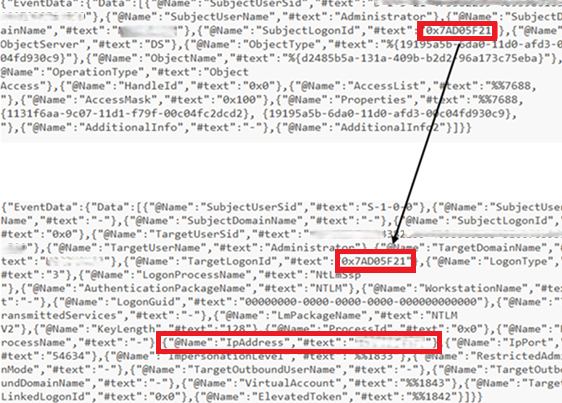
Figure 8 – Evidence of Malicious DCSync
A successful DCSync means that the threat actor has all domain password hashes. Although they are not clear-text credentials a threat actor can take those hashes offline and use them in a password cracking tool or could use them in a Pass-the-Hash (PTH) attack.
After a successful DCSync CybaVerse will always recommend a domain wide password reset as we must assume that all domain accounts could be compromised, this includes all users, admins and service accounts.
The KRBTGT hash will also have been exposed in a DCSync attack and CybaVerse would recommend resetting the password for the KRBTGT account twice waiting at least 10 hours between password resets. The KRBTGT account is used to create Kerberos tickets and if a threat actor has the KRBTGT accounts hash, they can create golden tickets that survive password resets. The reason you must reset the password twice is because two passwords are stored for the KRBTGT account for backwards compatibility. Therefore, you must reset the password and wait a minimum of 10 hours (to avoid service disruption) before resetting the password again. This will invalidate a golden ticket.
Browser Infostealer
Another technique the threat actor had attempted to use for extracting credentials was to target autofill data and cookies from Chrome user data. On one of the impacted hosts, CybaVerse identified the following scheduled task being created.
cmd.exe /Q /c schtasks /create /tn "ChromeDump" /tr "cmd.exe /c C:\programdata\Sun\fflink.exe C:\programdata\Sun\ips.txt chrome C:\programdata\Sun\ff 200" /sc once /st 00:00 /ru "REDACTED" /rp "" /f && schtasks /run /tn "ff" 1> \\127.0.0.1\ADMIN$\__1771797268.4932332 2>&1
The command created a scheduled task called “ChromeDump” that ran the command “C:\programdata\Sun\fflink.exe C:\programdata\Sun\ips.txt chrome C:\programdata\Sun\ff 200”. The scheduled task was not created with the intention of persistence it would run once. The scheduled task was purely a means to an end to allow the threat actor to execute the infostealer. After creating the scheduled task, it would trigger it.
The binary was compiled using PyInstaller and was decompiled using Uncompyle 6. Using this technique, CybaVerse were able to break down the functionality of this executable.
- Loop through a given list of IP addresses in (which would in this case be C:\ProgramData\Sun\ips.txt).
- For each IP address attempt to connect to \\<IP>\C$\Users using the credentials of the domain administrator account.
- Downloads user data from a defined browser (in this case Chrome was used as the argument) that contains things such as autofill data and cookies.
- Outputs autofill data, cookies and extensions per user / profile into text and JSON files.
Fortunately, the SMB connections failed in most cases and CybaVerse were able to recover the C:\ProgramData\Sun folder that had the output left inside it. Only one host had been connected to, and it was a server so didn’t have much in the way of autofill data or cookies as most users will not use browsers on a server.
In figure 9 (below), you can see what the output of the infostealer that CybaVerse recovered. There were several files indicating the endpoint, user profile and browser profile the data related to. For each user / profile it collected information such as autofill data, cookies and extensions. From this output CybaVerse can see that the threat actor only managed to connect to one endpoint. Reviewing the output there was nothing of value within the autofill data or extensions because the endpoint was a server and therefore browser usage was very minimal and not used for normal day-to-day activities.
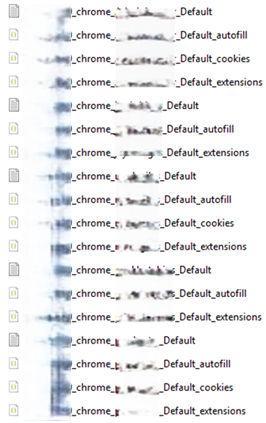 Figure 9 – Output of Infostealer
In figure 10, (below) you can see an example of the JSON output of the cookies file as an example.
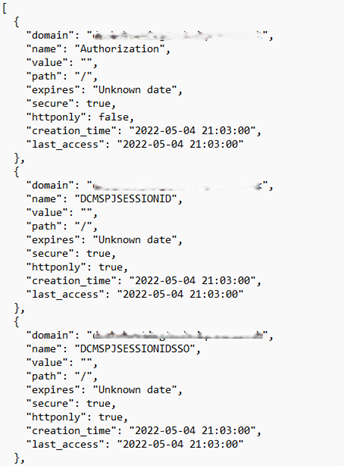 Figure 10 – Cookies Stolen Dumped by Infostealer
Another thing that CybaVerse noticed is that the command used to register and run the scheduled task is very indicative of Impacket WMIExec. Particularly the section 1> \\127.0.0.1\ADMIN$\__1771797268.4932332 2>&1. What this does is it writes output to the C:\Windows folder to a filename that starts with __ and is followed by the time of execution in epoch. The C:\Windows folder is exposed by the $ADMIN share and is used by Impacket WMIExec to get the results of the command execution. This aligns with other techniques seen by the threat actor as CybaVerse had other evidence of them using protocols such as WMI (Windows Management Instrumentation) and WinRM (Windows Remote Management) to run commands remotely.
CybaVerse believe that based off previous evidence of the threat actor unsuccessfully attempting to gain access to the Azure environment that the purpose of this was to potentially get a session token that they could inject into their browser that would provide them with access to Azure.
Key Takeaways
- Most organisations do not use remote registry queries. If it is not used the remote registry service can be disabled.
- Protect credential related registry hives by limiting access to hives such as SAM, SECURITY and SYSTEM to prevent credential dumping,
- Group Policy Management Console (GPMC): Enforce registry permissions via GPOs.
- Microsoft Endpoint Manager: Deploy configuration baselines for registry permissions.
- Use LSA protection to add an additional security layer for credential storage.
- Manage the access control list for “Replicating Directory Changes” and other permission associated with domain replication.
- Ensure a strong password policy is followed so that users are not re-using passwords be especially vigilant of administrator or service account passwords.
- Use Windows Local Administrator Password Solution (Windows LAPS) to automatically manage local administrator passwords of domain joined endpoints to prevent password re-use of administrator accounts.
- Monitor for DCSync attacks by monitoring 4662 events that do not originate from a domain controller machine account.
- Use application control to prevent execution from folders such as %ProgramData% and only allow signed binaries to run. This needs to be planned and risk-appetite assessed as this could impact legitimate program usage.
- Use a password manager to store credentials rather than the native browser password storage.
- Most EDRs will detect on access to highly sensitive registry keys such as those related to the SAM database or LSA secrets, as well as if browser user data is accessed.
- If a threat actor performs a DC Sync a domain wide password reset needs to be completed including all domain users, administrators and service accounts and the KRBTGT password needs to be reset twice waiting at least 10 hours between password resets.
Searching for Backups
The threat actor used Evil-WinRM to run PowerShell on remote hosts. Through script block logging we were able to capture this PowerShell and get an idea of what their intentions were.
Below is one of the script blocks that CybaVerse saw. You can see a Russian comment that indicates the threat actor was Russian speaking and the script itself uses the Win32 API and registry to look for evidence of installed software containing one of the strings “veeam”, “acronis”, “commvault”, “backup”, “nakivo”, “rubrik”, “tsm”, “networker”. It also looks for established network connections on ports commonly associated from backup software.
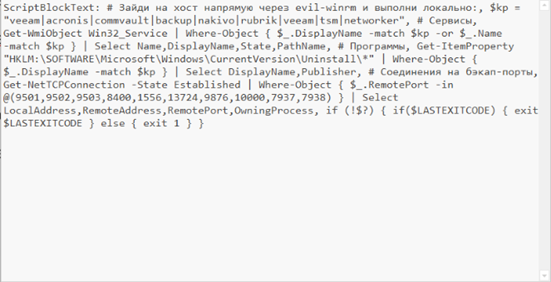 Figure 11 – Script Block Evidencing Searching for Backups
It is evident from this that the threat actor was attempting to identify backups which are often targeted in ransomware attacks to eliminate recovery options and facilitate double extortion style attacks. Given that data had already been exfiltrated from the file shares it was likely they were getting close to deploying ransomware and extorting the client.
Key Takeaways
- If WinRM (Windows Remote Management) is not required in your environment disable it completely by disabling the WinRM service.
- If WinRM is required lock down access using host-based firewalls to restrict WinRM access to / from specific devices.
- For backups storing a copy offsite / offline means recovery is still possible even if a threat actor managed to destroy / encrypt primary backups.
Windows Defender Exclusions
One of the final actions that CybaVerse saw before the environment was contained was the threat actor attempting to create a Window Defender exclusion for the folder C:\ProgramData\Sun on several hosts. This is the same folder the browser infostealer was in. CrowdStrike blocked the operation.
We can see from the CrowdStrike detection that the parent process is wmiprvse.exe which indicates that this command was run remotely via WMI (Windows Management Instrumentation).
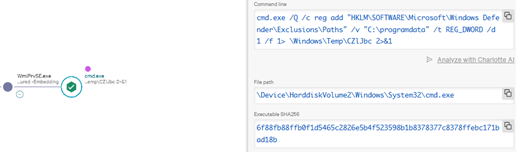 Figure 12 – Windows Defender Exclusion Creation Attempt
This event in combination with the threat actor searching for backups suggests that they were very close to deploying ransomware. Had CrowdStrike not blocked this operation the threat actor may have deployed ransomware.
It was at this point that CybaVerse got involved in the investigation, helped to contain the incident and performed an incident response and forensic analysis of impacted hosts to uncover the other techniques you see mentioned in this post.
Key Takeaways
- Use tamper protection in Windows Defender to prevent changes to Windows Defender settings such as adding or modifying exclusions even by local administrators.
- Most EDRs will detect and prevent the creations of suspicious Windows Defender exclusions.
If you’ve suffered a compromise and need incident response contact CybaVerse on 01243 972959.
CybaVerse also provide long-term monitoring of your environment with our MDR (Managed Detection & Response) service. Speak to our sales team on 01243 972959 or at sales@cybaverse.co.uk to find out more.